


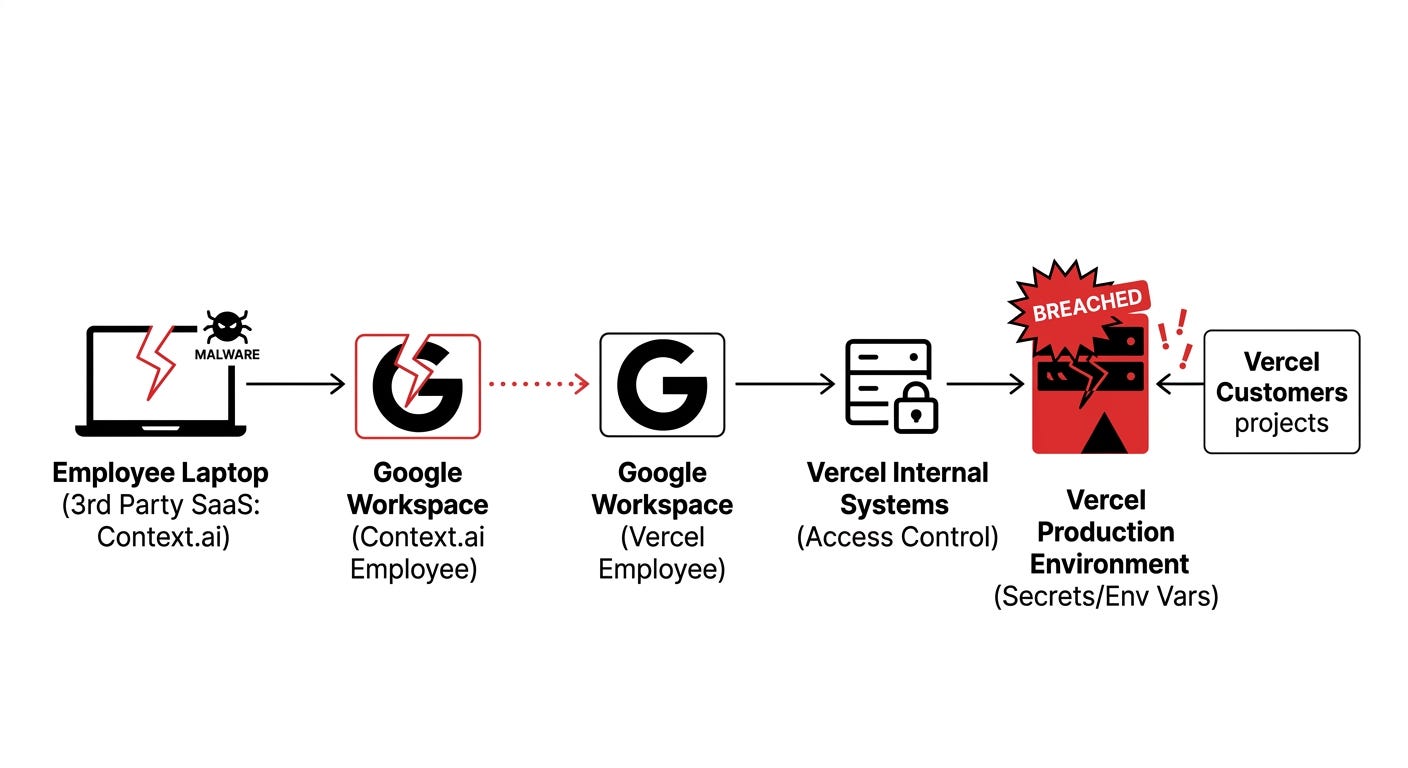
A few days ago, Vercel confirmed a security incident. The entry point was not their own infrastructure. It was a third-party SaaS vendor (Context.ai) whose employee got hit with infostealer malware. Those stolen credentials let attackers into a Vercel employee’s Google Workspace, which gave them access to environment variables for a “limited subset” of Vercel customers.
That is a supply-chain breach, not a direct hack of Vercel’s servers. But the effect is the same: my secrets were sitting in a system whose security depended on every vendor Vercel uses internally, and I had zero visibility into that chain.
For me, it was the third strike. Here is the full story.
Strike 1: Vercel’s per-seat pricing
I was happy on Vercel until I started collaborating.
I was running my projects on Vercel Pro with 4 collaborators. The bill: $160 per month. For a solo founder running multiple small projects with a few trusted contributors, that math stops making sense fast.
I did not want to gatekeep access to my own side projects to save money. So I moved to Netlify.
Strike 2: Netlify’s credit flip
Netlify used to have generous usage limits. Build minutes were metered clearly, and my fast builds fit comfortably in the lower tiers.
On September 5, 2025, Netlify moved all new accounts to credit-based pricing. Instead of build minutes being their own line item, everything (builds, bandwidth, function invocations, edge functions) draws from a unified credit pool.
What changed for me in practice:
Builds got more expensive and harder to predict
I was nudged onto the Personal plan to keep the lights on
I ran into HTTPS/SSL issues on custom domains that took way too long to resolve
Support was slow and felt scripted
None of this is a deal-breaker alone. Stacked together, it stopped feeling like infrastructure and started feeling like a relationship I had to manage.
Strike 3: The Vercel breach
Then the Vercel news dropped.
The part that stuck with me: even if Vercel’s engineers are world class (they are), my security posture was downstream of every SaaS vendor they use internally. A compromised laptop at Context.ai became my problem. I had no visibility into that chain, and no way to opt out.
The lesson was not “Vercel is bad.” The lesson was: platforms amplify supply-chain risk, and for projects where I care about who holds my secrets, that trade-off stopped making sense.
Why Hetzner?
Before getting to the stack, a quick word on provider choice. I looked at the usual suspects:
DigitalOcean: Great UX, plenty of tutorials, but roughly 2x the price of Hetzner for equivalent specs
Linode (now Akamai): Similar price to DigitalOcean, slightly more enterprise-oriented
Vultr: Competitive pricing, more global regions than Hetzner, but less generous RAM per tier
Hetzner won for three reasons:
Best price-to-performance on the planet. A $6 Hetzner box matches a $12 DigitalOcean droplet on specs
EU data residency in Germany and Finland, which helps with GDPR if you have European users
Hetzner Cloud Backups at 20% of the server cost, cheaper than most competitors’ backup add-ons
The catch: only EU and US data centers. If you need low latency in Asia or South America, pair Hetzner with Cloudflare's CDN (I do this anyway, more on that below).
What I moved to
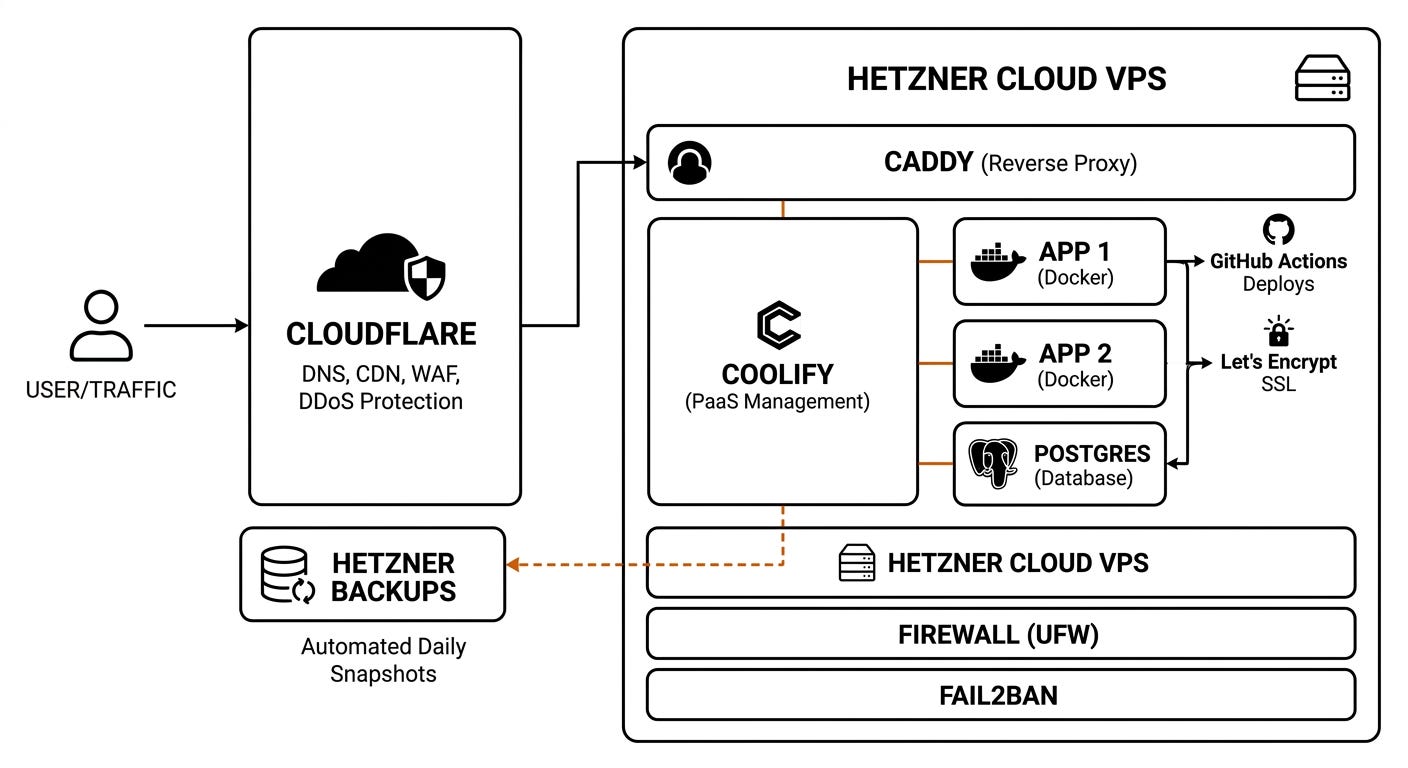
A $6 Hetzner VPS plus open-source tooling. Here is the full stack:
Hetzner Cloud for the VPS
Cloudflare in front of everything for DNS, CDN, and DDoS protection
Coolify as my self-hosted PaaS layer (more on this below)
Docker + Docker Compose for containerizing each project
Caddy as reverse proxy. Handles automatic HTTPS via Let’s Encrypt, HTTP/2, HTTP/3, static file serving, with a config short enough to fit on a postcard
UFW firewall with deny-by-default, only 22, 80, 443 open
Fail2ban for brute-force protection on SSH
Postgres in its own container with automated daily backups
GitHub Actions pushing builds on merge to main
Uptime Kuma for self-hosted monitoring
Web3Forms for contact form submissions (more on email below)
Cloudflare: the free layer that should be a default
Before anything hits my VPS, traffic goes through Cloudflare’s free tier. That gets me:
DDoS protection at the edge. My origin server never sees attack traffic
Global CDN caching for static assets. Pages load fast in Asia and South America even though my server is in Germany
Hidden origin IP. Attackers scanning the internet see Cloudflare, not my Hetzner box
DNS management with instant propagation
Free SSL at the edge (in addition to Caddy’s Let’s Encrypt certs at the origin)
This is not optional. If you run a VPS exposed to the internet, putting Cloudflare in front of it is table stakes.
Coolify: the piece that made this manageable
Coolify is a free, open-source, self-hosted alternative to Vercel, Netlify, and Heroku. You install it on your VPS, point your domain at it, and you get a clean web UI for:
Git-push deploys. Connect a GitHub repo, Coolify builds and deploys automatically
One-click services. Postgres, Redis, MongoDB, Wordpress, Plausible, anything in its template library spins up in under a minute
Automatic HTTPS. Coolify handles Let’s Encrypt certificates for you, no Caddy config required if you do not want to touch it
Built-in backups, logs, monitoring, and team access controls
No per-seat pricing. Add as many collaborators as you want. Your only bill is the VPS
The trade: you own the box, so you still patch the OS and manage hardware-level backups. But the day-to-day deploy experience feels exactly like Vercel, without the invoice.
Email: the one thing I did not self-host
If you are wondering what SMTP I use, the honest answer is: I do not run my own mail server, and neither should you.
Self-hosting SMTP is a nightmare. Deliverability depends on IP reputation, SPF, DKIM, DMARC, reverse DNS, and the mood of whoever manages Gmail’s spam filter that week. Even seasoned sysadmins avoid it.
For the Echoscan site, contact form submissions go through Web3Forms, which is a simple form-to-email relay. The form posts to their API, they deliver it to my inbox. No backend code needed on my side.
For transactional emails on other projects (password resets, receipts, notifications), I use Resend or Postmark. Both are cheap, both have clean APIs, both handle deliverability for you.
Self-host what benefits from ownership. Outsource what benefits from network effects. Email deliverability is pure network effect.
Backups: the cheap way and the free way
Two honest options:
Paid and easy: Hetzner Cloud Backups. Hetzner charges 20% of the server base price for automated backups (7 daily snapshots rotated). On a $6 server, that is about $1 per month. Lowest-friction path.
Free and open source: Restic to Hetzner Storage Box. Restic is an encrypted, deduplicated backup tool. Point it at a Hetzner Storage Box or Backblaze B2, write a short cron job, done. Slightly more setup, more control, lower long-term cost as your data grows.
I’d pick the paid option unless you are managing many servers which I am not.
Hetzner snapshots: my “the box died” insurance policy
The obvious pushback to a single-VPS setup is: “what if the box dies?”
Fair question. My answer is Hetzner snapshots. A snapshot is a full point-in-time image of your server. With a fresh snapshot on hand, I can:
Spin up a new Hetzner VPS from the snapshot in under 15 minutes
Update the DNS record in Cloudflare
Be back online before most people notice
Snapshots cost about $0.01 per GB per month. For a 40GB disk, that is roughly $0.40 a month. I take one before every big change and one on a weekly cron job.
Combined with daily automated backups, my recovery story is actually better than what I had on Vercel, where "recovery" meant redeploying and hoping the platform behaved.
The migration itself: zero downtime
Here is the part people worry about most, and it turned out to be the easiest.
Because everything ran in Docker locally, moving to the VPS was effectively a config copy plus a DNS switch:
Spun up the Hetzner VPS and installed Coolify
Deployed each project to the new VPS while the old Vercel/Netlify sites stayed live
Tested every route, every form, every database connection on the new setup using a temporary domain
When everything checked out, I flipped the DNS record in Cloudflare to point at the Hetzner IP
Done. No downtime, no broken links, no support tickets
That is the beauty of Docker. “It works on my machine” is finally just “it works.”
Trade-offs I won’t hide from you
This is not a free lunch. The honest ledger:
What you gain:
Full control over your secrets, your stack, your data
Predictable flat monthly cost
Faster builds and deploys
Real skills: Linux, networking, security hardening
No per-seat tax as your team grows
What you take on:
You are now the SRE. OS patches, security updates, log rotation, backups, all on you
If the box dies at 2am, no one is paging an on-call engineer for you (although, I AM trying to automate this. More on this in the future)
Zero-downtime deploys need a little thought (Coolify handles most of this)
Initial setup might take a weekend if you are new to Linux.
For most small teams and indie founders, Coolify flattens that learning curve enough that the trade is worth it.
Who this move is for
Not everyone. Stay on Vercel or Netlify if:
You are shipping fast and do not want to think about infrastructure
You need global edge deployment with zero config
Your team is large enough that per-seat pricing is a rounding error
Move to a VPS + Coolify if:
You are running multiple small-to-medium projects
Per-seat or credit pricing is starting to hurt
You want to own your security posture end-to-end
You are willing to invest a weekend to save serious money long term
The bigger point
Hosted platforms are convenient, and convenience has a price that is not always on the pricing page. Sometimes the price is per-seat. Sometimes it is credit volatility. Sometimes it is a supply-chain breach you did not sign up for.
Owning your stack is not the right answer for every project. But for small teams running their own products, the tooling has gotten good enough that “just run it yourself” is no longer the painful option it used to be.
I am not going back.
About Echoscan
This is what we do at Echoscan Software. We help small and mid-sized businesses:
Set up cost-effective infrastructure like the stack I described here
Automate repetitive processes with AI and RAG
Bring down software costs by replacing overpriced SaaS with open-source alternatives you actually own
If your business is bleeding money on tools you do not need, or you want to modernize without handing your data to five different vendors, we can help.
Get in touch: echoscansoftware.com